
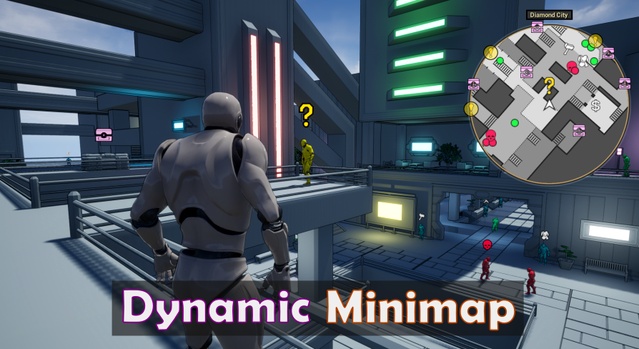
Dynamic Minimap System is a Blueprint-based UI kit for Unreal Engine that adds a customizable minimap, tracked object icons and in-world markers to a project. It supports Unreal Engine 4.20 through 5.8 and ships as an asset pack.
Dynamic Minimap System is a navigation UI kit for games that need a map overlay and tracked objects such as quest targets or NPCs. The minimap can be displayed as a circle or a square, with options for scale, optional area text and animated icons. The pack includes 24 icons that can be tinted to any color, and you can add your own. A prebuilt city level demonstrates the system, and the kit covers adjacent area transitions and overlapping areas, such as a building inside a larger outdoor zone. It is aimed at open-world, RPG and action projects built in Unreal Engine.
Specifications
| Seller | Mini Donut Studios |
|---|---|
| Type | UI Kit |
| Category | UI Kits / HUDs |
| Engines | Unreal Engine 4.20–5.8 |
| Distribution | Asset pack |
| Formats | Unreal Engine |
| File types | .uasset, .uproject, .uplugin |
| Unreal target platforms | Windows |
| Network replicated | No |
| Licenses | Personal, Professional |
| Published | 2026-09-24 |
Key features
- Circle or square minimap with adjustable scale and optional area text
- Tracks objects outside the minimap area
- 24 icons included, all tintable to any color
- One tickbox to show in-world icons above tracked objects
- Icon image, scale, animation type and visibility change at runtime
- Supports adjacent area transitions and overlapping area setups
- Prebuilt city level with usable level assets
- Blueprints fully commented with video setup guides
What Is Included in the Minimap UI Kit
The pack contains the minimap system itself, 24 icons that can be tinted to different colors, and a prebuilt city level that showcases the minimap in use. You are free to use the level assets in your own projects. The system can track objects outside the visible minimap area and can change icon properties at runtime, including image, scale, animation type and visibility.
In-world icons are handled by a single tickbox. When enabled, a tracked object such as a quest marker can appear above an NPC's head. Blueprints are fully commented, and extensive video guides cover setup and every customizable option.
The creator notes that minimap images must be drawn for your own project. The minimap images in the demo were drawn in Inkscape, a free open source 2D vector graphics program.
Technical Specs and Engine Compatibility
Dynamic Minimap System is distributed as an asset pack for Unreal Engine and uses the .uasset, .uproject and .uplugin file types. It supports Unreal Engine versions 4.20 through 5.8, including 4.20 to 4.27 and 5.0 to 5.8 individually. The Unreal target platform is Windows only.
The kit is not network replicated, so it is not set up for multiplayer replication out of the box. A Line Renderer post process is used in the demo level included in the package.
License options are Personal and Professional.
Use cases
- Open-world quest navigation
- RPG NPC quest markers
- Action game area transitions
- Building interiors within outdoor zones
- City exploration HUDs
Dynamic Minimap System FAQ
Which Unreal Engine versions does Dynamic Minimap System support?
The kit supports Unreal Engine 4.20 through 4.27 and 5.0 through 5.8. It is distributed as an asset pack in the Unreal Engine format.
Which file types are included?
The package uses .uasset, .uproject and .uplugin files. The supported Unreal target platform is Windows.
Is the minimap network replicated?
No. The system is not network replicated, so multiplayer replication must be added by you.
Which license options are available?
Dynamic Minimap System is available under Personal and Professional licenses.
Do I need to create my own minimap images?
Yes. The minimap images must be drawn to match your project. The creator used Inkscape, a free open source 2D vector graphics program, for the demo images.