
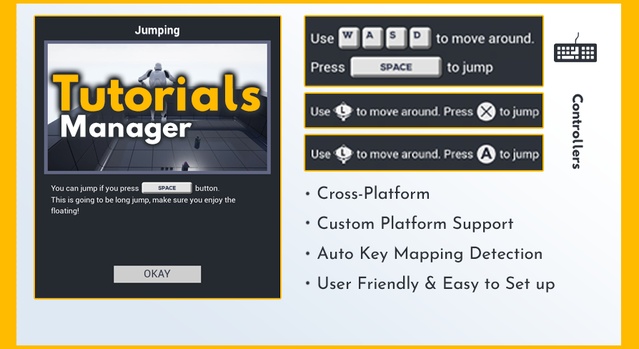
Tutorials Manager is a code plugin for Unreal Engine that lets developers set up gameplay tutorials and tips across a map, triggered by player location or shown manually. It supports Unreal Engine 4.27 through 5.8.
Tutorials Manager is an educational tool for Unreal Engine developers who need to explain controls and mechanics to players. Tutorial tips can be placed throughout a level and triggered one by one as the player reaches tutorial points, or shown manually without depending on the player's location. Tutorial text is parsed automatically, so key prompts such as movement keys are filled in from Enhanced Input or Action/Axis Mapping and displayed per platform. The plugin suits games that need onboarding, gameplay tips or mechanic demonstrations.
Specifications
| Seller | Restricted Studio |
|---|---|
| Type | Plugin |
| Category | Engine Tools |
| Engines | Unreal Engine 4.27–5.8 |
| Distribution | Code plugin |
| Formats | Unreal Engine |
| File types | .uasset, .uproject, .uplugin |
| Unreal target platforms | Android, Gear VR, HoloLens 2, Linux, Mac, Nintendo Switch, Oculus, PS4, SteamVR / HTC Vive, Windows, Xbox One, iOS |
| Blueprints | 5 |
| C++ classes | 3 |
| Network replicated | No |
| Licenses | Personal, Professional |
| Published | 2026-06-24 |
Key features
- Tutorials triggered by player location or shown manually
- Two tutorial types: Message and Modal
- Four trigger types and four end types per tutorial
- Automatic key prompts from Enhanced Input or Action/Axis Mapping
- Combinational key support such as Shift + E
- Icons for PC, Xbox, PlayStation and three VR headsets
- Up to 9 custom platforms with runtime switching
- More than 450 key and button textures, mostly 128×128
Tutorial Types, Triggers and End Conditions
Each tutorial can be configured with its own behavior. There are two tutorial types, Message and Modal. Four trigger types are available: In Range, On Crossed, On Previous Tutorial End and Manual. Four end types control when a tutorial closes: Auto Expire, On Any Key Down, On All Keys Down and Manual.
Key prompts are inserted into the tutorial text. With Enhanced Input, you reference indices in the text and select the Mapping Context and Input Action, so a prompt such as "Press {0} to move around" displays the mapped keys. With the Legacy Input System, axis mappings such as MoveForward and MoveRight are used in the text instead. Combinational keys such as Shift + E are supported, and players can switch between platforms at runtime.
Platform Support, Icons and Specs
The plugin includes controller icons for PC, Xbox, PlayStation, Oculus Quest (VR), Valve Index (VR) and HTC Vive (VR) out of the box. Other platforms need their own controller icon pack and a custom platform set up in Tutorials Manager, which supports up to 9 custom platforms. The plugin includes more than 450 key and button textures, mostly 128×128.
Tutorials Manager is a code plugin with 5 Blueprints and 3 C++ classes, built from a single runtime module, TutorialsManagerPlugin. It is not network replicated. The Unreal target platforms listed include Android, Linux, Mac, Windows, iOS, Xbox One, PS4, Nintendo Switch, HoloLens 2, Gear VR, Oculus and SteamVR / HTC Vive. It is licensed for Personal and Professional use.
Use cases
- Gameplay tutorials
- Gameplay tips for players
- Mechanic demonstrations
- Onboarding in VR games
- Cross-platform control prompts
Tutorials Manager FAQ
Which Unreal Engine versions does Tutorials Manager support?
Tutorials Manager supports Unreal Engine 4.27, 5.0, 5.1, 5.2, 5.3, 5.4, 5.5, 5.6, 5.7 and 5.8. The example project requires UE5.1 or later.
Which file types are included with Tutorials Manager?
The plugin uses .uasset, .uproject and .uplugin files. It is distributed as a code plugin for Unreal Engine.
Does Tutorials Manager support Enhanced Input and the Legacy Input System?
Yes. It detects action mappings automatically for the Enhanced Input System in UE5.1 and later, and also works with the Legacy Input System.
How many Blueprints and C++ classes does the plugin contain?
Tutorials Manager includes 5 Blueprints and 3 C++ classes. It is not network replicated.
Which license types are available for Tutorials Manager?
Tutorials Manager is available under Personal and Professional licenses.