
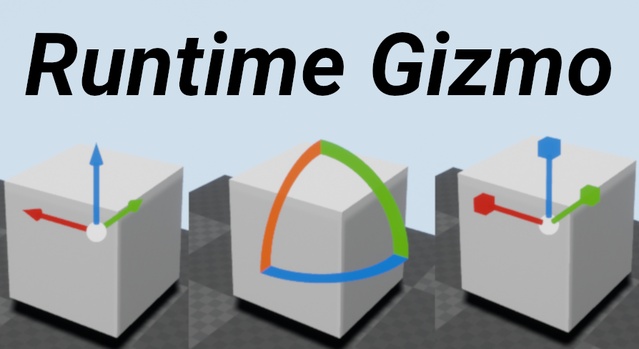
Runtime Gizmo (Transform Tool) is a Blueprint-based Unreal Engine game system that lets players and developers change the location, rotation and scale of static mesh actors at runtime using the mouse.
Runtime Gizmo (Transform Tool) is a game system for Unreal Engine that adds transform gizmos to a project so static mesh actors can be moved, rotated and scaled while the game is running. Editing works with the mouse and is built to feel similar to the gizmos found in the Unreal editor. The asset is distributed as an asset pack in .uasset, .uproject and .uplugin formats, and is fully made in Blueprints. It suits housing and furniture placement, in-game map editors and ArchViz projects that need to edit environments in shipping builds.
Specifications
| Seller | Blue Mountains |
|---|---|
| Type | Game System |
| Category | Gameplay Features |
| Engines | Unreal Engine 4.21–5.8 |
| Distribution | Asset pack |
| Formats | Unreal Engine |
| File types | .uasset, .uproject, .uplugin |
| Unreal target platforms | Linux, Mac, Windows |
| Blueprints | 1 Actor Blueprint for the Gizmo, 1 Blueprint for the screen widget and 1 Blueprint to fly around. |
| Network replicated | No. Dealing with changes made by the gizmo must be done by you. |
| Licenses | Personal, Professional |
| Published | 2026-06-18 |
Key features
- Edit location, rotation and scale of static mesh actors with the mouse
- Space key switches between location, rotation and scale modes
- M key cycles between global and local axis translation
- Fully built in Blueprints with one actor, one widget and one flying Blueprint
- Works in PIE, standalone games and shipping or packaged builds
- Independent of the editor, other assets and libraries
- Supports Unreal Engine 4.21 through 5.8
What Is Included in the Runtime Gizmo Pack
The pack contains three Blueprints: one Actor Blueprint for the gizmo, one Blueprint for the screen widget and one Blueprint to fly around the scene. Mouse controls handle the core workflow. The left mouse button selects a static mesh actor and then selects the gizmo to transform it. The Space key switches between location, rotation and scale modes, and the M key cycles between global and local axis translation.
Because the system is built entirely in Blueprints, it can be opened and modified without writing C++. The creator states that the asset does not depend on the editor, other assets or libraries.
Engine Compatibility and Runtime Build Support
Runtime Gizmo supports Unreal Engine 4.21 through 4.27 and 5.0 through 5.8. It works in Play in Editor, standalone games and shipping or packaged builds. The asset can be developed on Windows, Linux and Mac, and the Unreal target platforms are Linux, Mac and Windows, with the creator noting that any platform with mouse support should work.
The system is not network replicated. Changes made by the gizmo must be synchronized by the developer, which matters for multiplayer projects.
Use cases
- Player housing and furniture placement
- In-game map editors
- ArchViz runtime environment editing
- Shipping build level tweaking
Runtime Gizmo (Transform Tool) FAQ
Which Unreal Engine versions does Runtime Gizmo support?
Runtime Gizmo lists support for Unreal Engine 4.21 through 4.27 and 5.0 through 5.8, including each minor version in that range.
Which file types are included with Runtime Gizmo?
The asset pack includes .uasset, .uproject and .uplugin files, and is distributed in the Unreal Engine format.
Does Runtime Gizmo work in packaged builds?
Yes. The asset works in Play in Editor, standalone games and shipping or packaged builds.
Is Runtime Gizmo network replicated?
No. The creator states that the asset is not network replicated, so handling changes made by the gizmo is up to the developer.
Which license types are available for Runtime Gizmo?
Runtime Gizmo is offered under Personal and Professional licenses.