
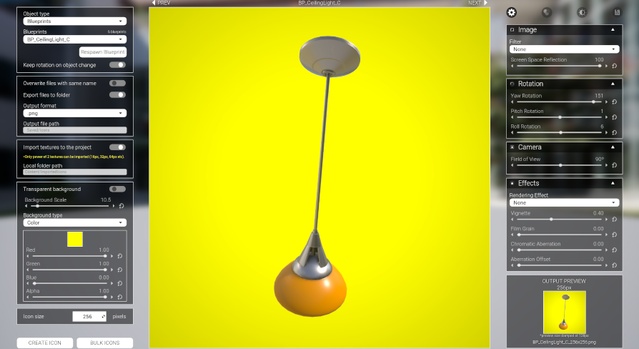
Icon Generator is a Blueprint game system for Unreal Engine that creates icons from static meshes, skeletal meshes and blueprint actors. It supports transparent or solid backgrounds, custom sizes and bulk export, and works with Unreal Engine 4.25 through 5.8.
Icon Generator by AleeZL is a tool for Unreal Engine projects that renders preview icons for your assets without leaving the editor. It handles static meshes, skeletal meshes and blueprint actors, so inventories, shop menus and UI panels can use consistent images. Icons can be exported with a transparent background, a solid color or a texture, in square or custom sizes. The system is built entirely in Blueprints and is distributed as an asset pack, which suits developers building item-heavy games, RPG inventories and crafting systems who want to generate icons in bulk rather than capture them by hand.
Specifications
| Seller | AleeZL |
|---|---|
| Type | Game System |
| Category | Automations |
| Engines | Unreal Engine 4.25–5.8 |
| Distribution | Asset pack |
| Formats | Unreal Engine |
| File types | .uasset, .uproject, .uplugin |
| Unreal target platforms | Windows |
| Network replicated | No |
| Licenses | Personal, Professional |
| Published | 2026-07-15 |
Key features
- Creates icons for static meshes, skeletal meshes and blueprints
- Transparent, solid color or texture backgrounds with custom sizes
- Bulk export of icons for all meshes in the project
- Orthographic camera option, silhouette and ambient occlusion settings
- Skeletal mesh animation control for capturing icons
- Material change tool for static and skeletal meshes
- Three asset loading methods: data tables, folders or auto search
- Supports Unreal Engine 4.25 through 5.8 on Windows
What Icon Generator Includes
The pack contains 2 Blueprints, 14 Widget Blueprints, 4 Data Tables (optional use), 4 Enumerations, 6 Structs, 1 Save Game, 1 Level, 1 Render Target, 42 Textures and 18 Materials, of which 12 are Material Instances and 6 are Materials. A demo folder with assets from Epic's starter content is included so you can test the workflow right away.
Assets can be loaded in three ways: by adding them manually to a data table, by selecting specific folders to search, or by auto search, which loads all static and skeletal meshes in the project. The creator also provides documentation and tutorial videos.
Keyboard and mouse controls let you move the camera with W, A, S and D, rotate objects with the left mouse button, zoom with the wheel, and create an icon with X.
Icon Generator Specs and Engine Compatibility
Icon Generator is distributed as an asset pack for Unreal Engine and supports versions 4.25, 4.26, 4.27, 5.0, 5.1, 5.2, 5.3, 5.4, 5.5, 5.6, 5.7 and 5.8. The files are .uasset, .uproject and .uplugin. Windows is the supported development platform.
The system is not network replicated. The creator notes that the Import to Project function does not work as expected on Unreal Engine 5.4 and later; the Export function does work, so exported icons can be dragged into the project. Applying the sRGB fix shown in the documentation is recommended when using the import function. Automatic import works only for power-of-two textures such as 16, 32 or 64 px.
Icon Generator for Inventories and Item UI
Icon Generator suits projects that need many item images, such as RPG inventories, loot systems and crafting menus. Its bulk export option renders icons for all meshes at once, which is useful when a project has large item libraries. The camera can be switched to orthographic, and options for silhouettes, foreground rendering and ambient occlusion help icons read clearly at small sizes.
The tool can also render blueprints with particles. Pure effects may not render correctly with a transparent background, so test those cases before bulk exporting.
Use cases
- RPG inventory icons
- Loot and item systems
- Crafting menu images
- Shop and UI item previews
- Skeletal character portrait icons
Icon Generator FAQ
Which Unreal Engine versions does Icon Generator support?
Icon Generator supports Unreal Engine 4.25, 4.26, 4.27, 5.0, 5.1, 5.2, 5.3, 5.4, 5.5, 5.6, 5.7 and 5.8.
Which file types are included with Icon Generator?
The pack includes .uasset, .uproject and .uplugin files, distributed as an asset pack for Unreal Engine.
Is Icon Generator network replicated?
No. The system is not network replicated.
Does the Import to Project function work on Unreal Engine 5.4 and later?
The creator reports that Import to Project does not work as expected on Unreal Engine 5.4 and later, while the Export function does work. Exported icons can be dragged into the project manually.
Which license types are available for Icon Generator?
Icon Generator is available under Personal and Professional licenses.