
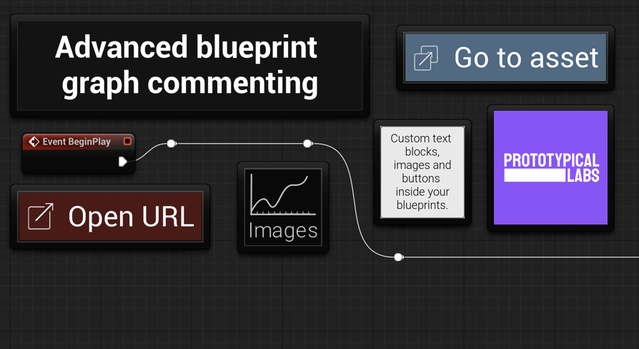
Advanced Commenting is a code plugin for Unreal Engine 4.27–5.6 that adds customizable button, image and text block comment nodes to Blueprint graphs, helping teams document and link their work inside the editor.
Advanced Commenting is an editor tool from Prototypical Labs for teams that document their Blueprint work. It adds three comment node types that work in Blueprint graphs and animation Blueprint graphs, so links, reference images and explanations can sit right beside the logic they describe. The plugin is tagged for collaboration, tutorials and team documentation, and it suits production teams whose Unreal projects depend on clear, shared notes. It ships as a code plugin with one example Blueprint and is only loaded in the editor, so it is not packaged with the game.
Specifications
| Seller | Prototypical Labs |
|---|---|
| Type | Plugin |
| Category | Engine Tools |
| Engines | Unreal Engine 4.27–5.6 |
| Distribution | Code plugin |
| Formats | Unreal Engine |
| File types | .uasset, .uproject, .uplugin |
| Unreal target platforms | Linux, Mac, Windows |
| Blueprints | 1 for example |
| C++ classes | 10 |
| Network replicated | Uncooked only. Not applicable. |
| Licenses | Personal, Professional |
| Published | 2025-07-13 |
Key features
- Button Comment nodes that open web URLs or assets in the editor
- Image Comment nodes with local file or texture sources
- Text Block Comment nodes with optional headings and auto-wrap
- Works in Blueprint and animation Blueprint graphs
- Project-specific default values for consistent comment styling
- Relative project paths in buttons to open files in-browser
- Non-English character support
- Editor-only module that is not packaged with the game
Button, Image and Text Block Comment Nodes
The Button Comment node has two modes: it can open a web URL, such as documentation, work tickets or tutorials, or open an asset in the editor, including C++ classes. Button colors, text, font and icons are customizable, and tooltips show the URL or asset name.
Image Comment nodes display design sketches, structure diagrams or branding. Images can come from local files in the project folder or from textures, and local files can be stored outside the Content folder so they are less likely to be packaged by accident. Size can be set with a multiplier or by width or height, and aspect ratio is kept.
Text Block Comment nodes support optional headings and customizable colors, font, padding, justification and wrap width, with auto-wrapping and an editable text box on the node.
Setup, Compatibility and Project Defaults
Advanced Commenting works with Unreal Engine 4.27, 5.0 through 5.6, and is distributed as a code plugin with the file types .uasset, .uproject and .uplugin. The creator describes it as supporting Windows, Mac and Linux development. Because the editor module is uncooked only, it does not add to packaged builds for any target platform.
Teams can set project-specific default values so comment nodes match a shared visual style. The plugin does not add comment nodes to the material graph at this time.
Use cases
- Team Blueprint documentation
- Onboarding and tutorial graphs
- Linking tickets and web docs in-editor
- Sharing design sketches in Blueprints
- Animation Blueprint annotation
Advanced Commenting FAQ
Which Unreal Engine versions does Advanced Commenting support?
Advanced Commenting supports Unreal Engine 4.27, 5.0, 5.1, 5.2, 5.3, 5.4, 5.5 and 5.6.
Which file types are included with Advanced Commenting?
The plugin includes .uasset, .uproject and .uplugin files and is distributed as a code plugin.
Does Advanced Commenting work in material graphs?
No. The creator states the plugin does not add these comment nodes to the material graph at this time. It does work in animation Blueprints.
Is Advanced Commenting packaged with my game?
No. The AdvancedCommentingEditor module is uncooked only and loads in the editor, so it is not packaged.
Which license options are available?
Advanced Commenting is offered under Personal and Professional license types.